🍌 Turn Your Product Shot into Campaign Gold
Want to showcase your product in professional ad spaces — without hiring a creative team?
With Nano Banana and Gemini’s image + video tools, you can turn a simple photo into full-fledged ad campaigns in just a few clicks.
🧩 Step 1: Get Started
1️⃣ Open Gemini and click Tools.
2️⃣ Toggle on Create Images.
3️⃣ Upload your product photo and type a detailed prompt describing your ad concept or target environment.
🎨 Step 2: Write Creative Prompts for Diverse Ad Spaces
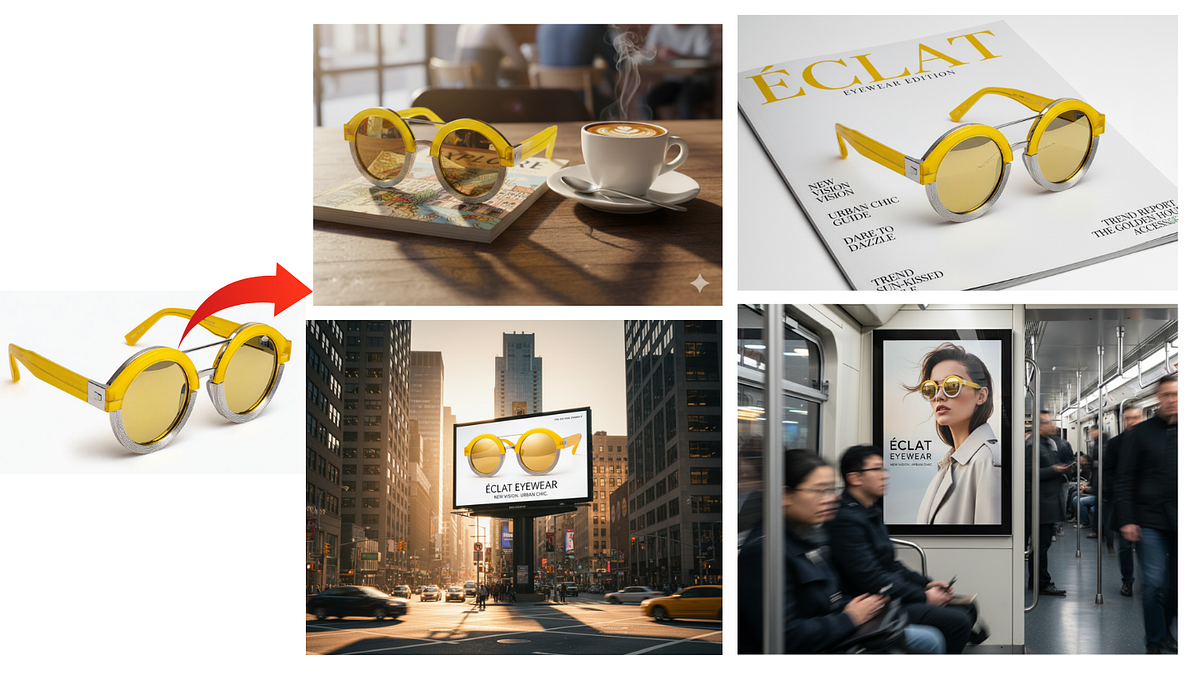
To make this test simple and consistent, the same product image is used — a sleek perfume bottle — across every ad environment below.
Use a sleek amber-glass perfume bottle with gold typography — elegant and photogenic.
This helps to see how Nano Banana and Gemini’s Create Images tool adapt lighting, reflections, and perspective for different placements while preserving brand identity.
Show my product featured in a glossy fashion magazine spread with minimalist props and soft lighting.
Display the item on a busy café menu board with real reflections and food nearby.
Render a supermarket shelf talker ad with shoppers blurred in the background.
Place the product in a subway digital panel with city lights visible through the windows.
Create a social media carousel for the product styled like a trendy influencer unboxing reel.
⚡ Step 3: Generate Your Ad Mockups
Click Generate and watch your product appear in realistic spaces — complete with correct lighting, shadows, and perspective.