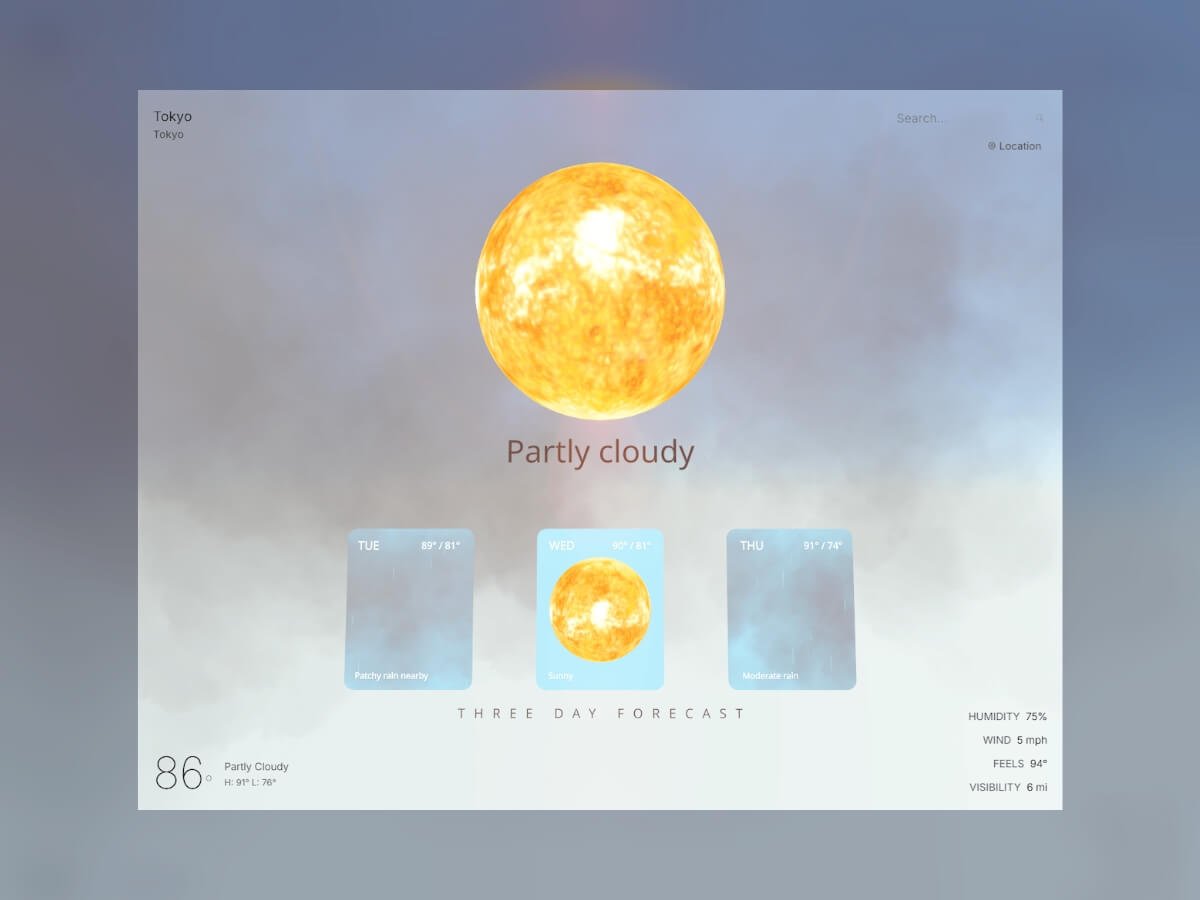
I’ve always been interested in data visualization using Three.js / R3F, and I thought a weather web app would be the perfect place to start. One of my favorite open-source libraries, @react-three/drei, already has a bunch of great tools like clouds, sky, and stars that fit perfectly into visualizing the weather in 3D.
This tutorial explores how to transform API data into a 3D experience, where we add a little flair and fun to weather visualization.
The Technology Stack
Our weather world is built on a foundation of some of my favorite technologies:
Weather Components
The heart of our visualization lies in conditionally showing a realistic sun, moon, and/or clouds based on the weather
results from your city or a city you search for, particles that simulate rain or snow, day/night logic, and some fun
lighting effects during a thunderstorm. We’ll start by building these weather components and then move on to displaying
them based on the results of the WeatherAPI call.
Sun + Moon Implementation
Let’s start simple: we’ll create a sun and moon component that’s just a sphere with a realistic texture wrapped
around it. We’ll also give it a little rotation and some lighting.
// Sun.js and Moon.js Component, a texture wrapped sphere
import React, { useRef } from 'react';
import { useFrame, useLoader } from '@react-three/fiber';
import { Sphere } from '@react-three/drei';
import * as THREE from 'three';

const Sun = () => {
  const sunRef = useRef();

  const sunTexture = useLoader(THREE.TextureLoader, '/textures/sun_2k.jpg');

  useFrame((state) => {
    if (sunRef.current) {
      sunRef.current.rotation.y = state.clock.getElapsedTime() * 0.1;
    }
  });

  const sunMaterial = new THREE.MeshBasicMaterial({
    map: sunTexture,
  });

  return (


      {/* Sun lighting */}


  );
};

export default Sun;
I grabbed the CC0 texture from here. The moon component is essentially the same; I used this image. The pointLight intensity is low because most of our lighting will come from the sky.
Rain: Instanced Cylinders
Next, let’s create a rain particle effect. To keep things performant, we’re going to use instancedMesh instead of creating a separate mesh component for each rain particle. We’ll render a single geometry () multiple times with different transformations (position, rotation, scale). Also, instead of creating a new THREE.Object3D for each particle in every frame, we’ll reuse a single dummy object. This saves memory and prevents the overhead of creating and garbage-collecting a large number of temporary objects within the animation loop. We’ll also use the useMemo hook to create and initialize the particles array only once when the component mounts.
// Rain.js - instanced rendering
const Rain = ({ count = 1000 }) => {
  const meshRef = useRef();
  const dummy = useMemo(() => new THREE.Object3D(), []);

  const particles = useMemo(() => {
    const temp = [];
    for (let i = 0; i < count; i++) {
      temp.push({
        x: (Math.random() - 0.5) * 20,
        y: Math.random() * 20 + 10,
        z: (Math.random() - 0.5) * 20,
        speed: Math.random() * 0.1 + 0.05,
      });
    }
    return temp;
  }, [count]);

  useFrame(() => {
    particles.forEach((particle, i) => {
      particle.y -= particle.speed;
      if (particle.y < -1) {
        particle.y = 20; // Reset to top
      }

      dummy.position.set(particle.x, particle.y, particle.z);
      dummy.updateMatrix();
      meshRef.current.setMatrixAt(i, dummy.matrix);
    });
    meshRef.current.instanceMatrix.needsUpdate = true;
  });

  return (


  );
};
When a particle reaches a negative Y-axis level, it’s immediately recycled to the top of the scene with a new random horizontal position, creating the illusion of continuous rainfall without constantly creating new objects.
Snow: Physics-Based Tumbling
We’ll use the same basic template for the snow effect, but instead of the particles falling straight down, we’ll give them some drift.
// Snow.js - Realistic drift and tumbling with time-based rotation
useFrame((state) => {
  particles.forEach((particle, i) => {
    particle.y -= particle.speed;
    particle.x += Math.sin(state.clock.elapsedTime + i) * particle.drift;

    if (particle.y < -1) {
      particle.y = 20;
      particle.x = (Math.random() - 0.5) * 20;
    }

    dummy.position.set(particle.x, particle.y, particle.z);
    // Time-based tumbling rotation for natural snowflake movement
    dummy.rotation.x = state.clock.elapsedTime * 2;
    dummy.rotation.y = state.clock.elapsedTime * 3;
    dummy.updateMatrix();
    meshRef.current.setMatrixAt(i, dummy.matrix);
  });
  meshRef.current.instanceMatrix.needsUpdate = true;
});
The horizontal drift uses Math.sin(state.clock.elapsedTime + i), where state.clock.elapsedTime provides a continuously increasing time value and i offsets each particle’s timing. This creates a natural swaying motion in which each snowflake follows its own path. The rotation updates apply small increments to both the X and Y axes, creating the tumbling effect.
Storm System: Multi-Component Weather Events
When a storm rolls in, I wanted to simulate dark, brooding clouds and flashes of lightning. This effect requires combining multiple weather effects simultaneously. We’ll import our rain component, add some clouds, and implement a lightning effect with a pointLight that simulates flashes of lightning coming from inside the clouds.
// Storm.js
const Storm = () => {
  const cloudsRef = useRef();
  const lightningLightRef = useRef();
  const lightningActive = useRef(false);

  useFrame((state) => {
    // Lightning flash with ambient light
    if (Math.random() < 0.003 && !lightningActive.current) {
      lightningActive.current = true;

      if (lightningLightRef.current) {
        // Random X position for each flash
        const randomX = (Math.random() - 0.5) * 10; // Range: -5 to 5
        lightningLightRef.current.position.x = randomX;

        // Single bright flash
        lightningLightRef.current.intensity = 90;

        setTimeout(() => {
          if (lightningLightRef.current) lightningLightRef.current.intensity = 0;
          lightningActive.current = false;
        }, 400);
      }
    }
  });

 return (


        {/* Additional cloud configurations... */}


      {/* Heavy rain - 1500 particles */}


  );
};
The lightning system uses a simple ref-based cooldown mechanism to prevent constant flashing. When lightning triggers, it creates a single bright flash with random positioning. The system uses setTimeout to reset the light intensity after 400ms, creating a realistic lightning effect without complex multi-stage sequences.
Clouds: Drei Cloud
For weather types like cloudy, partly cloudy, overcast, foggy, rainy, snowy, and misty, we’ll pull in our clouds component. I wanted the storm component to have its own clouds because storms should have darker clouds than the conditions above. The clouds component will simply display Drei clouds, and we’ll pull it all together with the sun or moon component in the next section.
const Clouds = ({ intensity = 0.7, speed = 0.1 }) => {
  // Determine cloud colors based on weather condition
  const getCloudColors = () => {
      return {
        primary: '#FFFFFF',
        secondary: '#F8F8F8',
        tertiary: '#F0F0F0',
        light: '#FAFAFA',
        intensity: intensity
      };
  };

  const colors = getCloudColors();
  return (


        {/* Large fluffy cloud cluster */}

        {/* Additional clouds... */}


  );
};
API-Driven Logic: Putting It All Together
Now that we’ve built our weather components, we need a system to decide which ones to display based on real weather data. The WeatherAPI.com service provides detailed current conditions that we’ll transform into our 3D scene parameters. The API gives us condition text like “Partly cloudy,” “Thunderstorm,” or “Light snow,” but we need to convert these into our component types.
// weatherService.js - Fetching real weather data
const response = await axios.get(
  `${WEATHER_API_BASE}/forecast.json?key=${API_KEY}&q=${location}&days=3&aqi=no&alerts=no&tz=${Intl.DateTimeFormat().resolvedOptions().timeZone}`,
  { timeout: 10000 }
);
The API request includes time zone information so we can accurately determine day or night for our Sun/Moon system. The days=3 parameter grabs forecast data for our portal feature, while aqi=no&alerts=no keeps the payload lean by excluding data we don’t need.
Converting API Conditions to Component Types
The heart of our system is a simple parsing function that maps hundreds of possible weather descriptions to our manageable set of visual components:
// weatherService.js - Converting weather text to renderable types
export const getWeatherConditionType = (condition) => {
  const conditionLower = condition.toLowerCase();

  if (conditionLower.includes('sunny') || conditionLower.includes('clear')) {
    return 'sunny';
  }
  if (conditionLower.includes('thunder') || conditionLower.includes('storm')) {
    return 'stormy';
  }
  if (conditionLower.includes('cloud') || conditionLower.includes('overcast')) {
    return 'cloudy';
  }
  if (conditionLower.includes('rain') || conditionLower.includes('drizzle')) {
    return 'rainy';
  }
  if (conditionLower.includes('snow') || conditionLower.includes('blizzard')) {
    return 'snowy';
  }
  // ... additional fog and mist conditions
  return 'cloudy';
};
This string-matching approach handles edge cases gracefully—whether the API returns “Light rain,” “Heavy rain,” or “Patchy light drizzle,” they all map to our rainy type and trigger the appropriate 3D effects. This way, we can reuse our main components without needing a separate component for each weather condition.
Conditional Component Rendering
The magic happens in our WeatherVisualization component, where the parsed weather type determines exactly which 3D components to render:
// WeatherVisualization.js - Bringing weather data to life
const renderWeatherEffect = () => {
  if (weatherType === 'sunny') {
    if (partlyCloudy) {
      return (
        <>
          {isNight ?  : }

        >
      );
    }
    return isNight ?  : ;
  } else if (weatherType === 'rainy') {
    return (
      <>


      >
    );
  } else if (weatherType === 'stormy') {
    return ; // Includes its own clouds, rain, and lightning
  }
  // ... additional weather types
};
This conditional system ensures we only load the particle systems we actually need. A sunny day renders just our Sun component, while a storm loads our complete Storm system with heavy rain, dark clouds, and lightning effects. Each weather type gets its own combination of the components we built earlier, creating distinct visual experiences that match the real weather conditions.
Dynamic Time-of-Day System
Weather isn’t just about conditions—it’s also about timing. Our weather components need to know whether to show the sun or moon, and we need to configure Drei’s Sky component to render the appropriate atmospheric colors for the current time of day. Fortunately, our WeatherAPI response already includes the local time for any location, so we can extract that to drive our day/night logic.
The API provides local time in a simple format that we can parse to determine the current period:
// Scene3D.js - Parsing time from weather API data
const getTimeOfDay = () => {
  if (!weatherData?.location?.localtime) return 'day';
  const localTime = weatherData.location.localtime;
  const currentHour = new Date(localTime).getHours();

  if (currentHour >= 19 || currentHour <= 6) return 'night';
  if (currentHour >= 6 && currentHour < 8) return 'dawn';
  if (currentHour >= 17 && currentHour < 19) return 'dusk';
  return 'day';
};
This gives us four distinct time periods, each with different lighting and sky configurations. Now we can use these periods to configure Drei’s Sky component, which handles atmospheric scattering and generates realistic sky colors.
Dynamic Sky Configuration
Drei’s Sky component is fantastic because it simulates actual atmospheric physics—we just need to adjust atmospheric parameters for each time period:
// Scene3D.js - Time-responsive Sky configuration
{timeOfDay !== 'night' && (
   {
      if (timeOfDay === 'dawn') {
        return [100, -5, 100]; // Sun below horizon for darker dawn colors
      } else if (timeOfDay === 'dusk') {
        return [-100, -5, 100]; // Sun below horizon for sunset colors
      } else { // day
        return [100, 20, 100]; // High sun position for bright daylight
      }
    })()}
    inclination={(() => {
      if (timeOfDay === 'dawn' || timeOfDay === 'dusk') {
        return 0.6; // Medium inclination for transitional periods
      } else { // day
        return 0.9; // High inclination for clear daytime sky
      }
    })()}
    turbidity={(() => {
      if (timeOfDay === 'dawn' || timeOfDay === 'dusk') {
        return 8; // Higher turbidity creates warm sunrise/sunset colors
      } else { // day
        return 2; // Lower turbidity for clear blue sky
      }
    })()}
  />
)}
The magic happens in the positioning. During dawn and dusk, we place the sun just below the horizon (-5 Y position) so Drei’s Sky component generates those warm orange and pink colors we associate with sunrise and sunset. The turbidity parameter controls atmospheric scattering, with higher values creating more dramatic color effects during transitional periods.
Nighttime: Simple Black Background + Stars
For nighttime, I made a deliberate choice to skip Drei’s Sky component entirely and use a simple black background instead. The Sky component can be computationally expensive, and for nighttime scenes, a pure black backdrop actually looks better and performs significantly faster. We complement this with Drei’s Stars component for that authentic nighttime atmosphere:
// Scene3D.js - Efficient nighttime rendering
{!portalMode && isNight && }

{/* Stars create the nighttime atmosphere */}
{isNight && (

)}
Drei’s Stars component creates 5,000 individual stars scattered across a 100-unit sphere with realistic depth variation. The saturation={0} keeps them properly desaturated for authentic nighttime visibility, while the gentle speed={1} creates subtle movement that simulates the natural motion of celestial bodies. Stars only appear during nighttime hours (7 PM to 6 AM) and automatically disappear at dawn, creating a smooth transition back to Drei’s daytime Sky component.
This approach gives us four distinct atmospheric moods—bright daylight, warm dawn colors, golden dusk tones, and star-filled nights—all driven automatically by the real local time from our weather data.
Forecast Portals: Windows Into Tomorrow’s Weather
Like any good weather app, we don’t want to just show current conditions but also what’s coming next. Our API returns a three-day forecast that we transform into three interactive portals hovering in the 3D scene, each one showing a preview of that day’s weather conditions. Click on a portal and you’re transported into that day’s atmospheric environment.
Building Portals with MeshPortalMaterial
The portals use Drei’s MeshPortalMaterial, which renders a complete 3D scene to a texture that gets mapped onto a plane. Each portal becomes a window into its own weather world:
// ForecastPortals.js - Creating interactive weather portals
const ForecastPortal = ({ position, dayData, index, onEnter }) => {
  const materialRef = useRef();

  // Transform forecast API data into our weather component format
  const portalWeatherData = useMemo(() => ({
    current: {
      temp_f: dayData.day.maxtemp_f,
      condition: dayData.day.condition,
      is_day: 1, // Force daytime for consistent portal lighting
      humidity: dayData.day.avghumidity,
      wind_mph: dayData.day.maxwind_mph,
    },
    location: {
      localtime: dayData.date + 'T12:00' // Set to noon for optimal lighting
    }
  }), [dayData]);

  return (


          {/* Each portal renders a complete weather scene */}


      {/* Weather info overlay */}

        {formatDay(dayData.date, index)}


        {Math.round(dayData.day.maxtemp_f)}° / {Math.round(dayData.day.mintemp_f)}°


        {dayData.day.condition.text}


  );
};
The roundedPlaneGeometry from the maath library gives our portals those smooth, organic edges instead of sharp rectangles. The [2, 2.5, 0.15] parameters create a 2×2.5 unit portal with 0.15 radius corners, providing enough rounding to look visually appealing.
Interactive States and Animations
Portals respond to user interaction with smooth state transitions. The system tracks two primary states: inactive and fullscreen:
// ForecastPortals.js - State management and blend animations
const ForecastPortal = ({ position, dayData, isActive, isFullscreen, onEnter }) => {
  const materialRef = useRef();

  useFrame(() => {
    if (materialRef.current) {
      // Smooth blend animation - only inactive (0) or fullscreen (1)
      const targetBlend = isFullscreen ? 1 : 0;
      materialRef.current.blend = THREE.MathUtils.lerp(
        materialRef.current.blend || 0,
        targetBlend,
        0.1
      );
    }
  });

  // Portal content and UI elements hidden in fullscreen mode
  return (


      {!isFullscreen && (
        <>
          {/* Temperature and condition text only show in preview mode */}

            {formatDay(dayData.date, index)}

        >
      )}

  );
};
The blend property controls how much the portal takes over your view. At 0 (inactive), you see the portal as a framed window into the weather scene. At 1 (fullscreen), you’re completely transported inside that day’s weather environment. The THREE.MathUtils.lerp function creates smooth transitions between these two states when clicking in and out of portals.
Fullscreen Portal Experience
When you click a portal, it fills your entire view with that day’s weather. Instead of looking at tomorrow’s weather through a window, you’re standing inside it:
// Scene3D.js - Fullscreen portal handling
const handlePortalStateChange = (isPortalActive, dayData) => {
  setPortalMode(isPortalActive);
  if (isPortalActive && dayData) {
    // Create immersive weather environment for the selected day
    const portalData = {
      current: {
        temp_f: dayData.day.maxtemp_f,
        condition: dayData.day.condition,
        is_day: 1,
        humidity: dayData.day.avghumidity,
      },
      location: { localtime: dayData.date + 'T12:00' }
    };
    setPortalWeatherData(portalData);
  }
};
In fullscreen mode, the portal weather data drives the entire scene: the Sky component, lighting, and all weather effects now represent that forecasted day. You can orbit around inside tomorrow’s storm or bask in the gentle sunlight of the day after. When you exit (click outside the portal), the system smoothly transitions back to the current weather conditions.
The key insight is that each portal runs our same WeatherVisualization component but with forecast data instead of current conditions. The portalMode={true} prop optimizes the components for smaller render targets—fewer particles, simpler clouds, but the same conditional logic we built earlier.
Now that we’ve introduced portals, we need to update our weather components to support this optimization. Going back to our conditional rendering examples, we add the portalMode prop:
// WeatherVisualization.js - Updated with portal support
if (weatherType === 'rainy') {
  return (
    <>


    >
  );
} else if (weatherType === 'snowy') {
  return (
    <>


    >
  );
}
And our Clouds component is updated to render fewer, simpler clouds in portal mode:
// Clouds.js - Portal optimization
const Clouds = ({ intensity = 0.7, speed = 0.1, portalMode = false }) => {
  if (portalMode) {
    return (

        {/* Only 2 centered clouds for portal preview */}


    );
  }
  // Full cloud system for main scene (6+ detailed clouds)
  return {/* ... full cloud configuration ... */};
};
This dramatically reduces both particle counts (87.5% fewer rain particles) and cloud complexity (a 67% reduction from 6 detailed clouds to 2 centered clouds), ensuring smooth performance when multiple portals show weather effects simultaneously.
Integration with Scene3D
The portals are positioned and managed in our main Scene3D component, where they complement the current weather visualization:
// Scene3D.js - Portal integration
<>
  {/* Current weather in the main scene */}


  {/* Three-day forecast portals */}

>
When you click a portal, the entire scene transitions to fullscreen mode, showing that day’s weather in complete detail. The portal system tracks active states and handles smooth transitions between preview and immersive modes, creating a seamless way to explore future weather conditions alongside the current atmospheric environment.
The portals transform static forecast numbers into explorable 3D environments. Instead of reading “Tomorrow: 75°, Partly Cloudy,” you see and feel the gentle drift of cumulus clouds with warm sunlight filtering through.
Adding Cinematic Lens Flares
Our Sun component looks great, but to really make it feel cinematic, I wanted to implement a subtle lens flare effect. For this, I’m using the R3F-Ultimate-Lens-Flare library (shoutout to Anderson Mancini), which I installed manually by following the repository’s instructions. While lens flares typically work best with distant sun objects rather than our close-up approach, I still think it adds a nice cinematic touch to the scene.
The lens flare system needs to be smart about when to appear. Just like our weather components, it should only show when it makes meteorological sense:
// Scene3D.js - Conditional lens flare rendering
const PostProcessingEffects = ({ showLensFlare }) => {
  if (!showLensFlare) return null;

  return (


  );
};
The key parameters create a realistic lens flare effect: glareSize and flareSize both at 1.68 give prominent but not overwhelming flares, while ghostScale={0.03} adds subtle lens reflection artifacts. The haloScale={3.88} creates that large atmospheric glow around the sun.
The lens flare connects to our weather system through a visibility function that determines when the sun should be visible:
// weatherService.js - When should we show lens flares?
export const shouldShowSun = (weatherData) => {
  if (!weatherData?.current?.condition) return true;
  const condition = weatherData.current.condition.text.toLowerCase();

  // Hide lens flare when weather obscures the sun
  if (condition.includes('overcast') ||
      condition.includes('rain') ||
      condition.includes('storm') ||
      condition.includes('snow')) {
    return false;
  }

  return true; // Show for clear, sunny, partly cloudy conditions
};

// Scene3D.js - Combining weather and time conditions
const showLensFlare = useMemo(() => {
  if (isNight || !weatherData) return false;
  return shouldShowSun(weatherData);
}, [isNight, weatherData]);
This creates realistic behavior where lens flares only appear during daytime clear weather. During storms, the sun (and its lens flare) is hidden by clouds, just like in real life.
Performance Optimizations
Since we’re rendering thousands of particles, multiple cloud systems, and interactive portals—sometimes simultaneously—it can get expensive. As mentioned above, all our particle systems use instanced rendering to draw thousands of raindrops or snowflakes in single GPU calls. Conditional rendering ensures we only load the weather effects we actually need: no rain particles during sunny weather, no lens flares during storms. However, there’s still a lot of room for optimization. The most significant improvement comes from our portal system’s adaptive rendering. We already discussed decreasing the number of clouds in portals above, but when multiple forecast portals show precipitation simultaneously, we dramatically reduce particle counts.
// WeatherVisualization.js - Smart particle scaling
{weatherType === 'rainy' && }
{weatherType === 'snowy' && }
This prevents the less-than-ideal scenario of rendering 4 × 800 = 3,200 rain particles when all portals show rain. Instead, we get 800 + (3 × 100) = 1,100 total particles while maintaining the visual effect.
API Reliability and Caching
Beyond 3D performance, we need the app to work reliably even when the weather API is slow, down, or rate-limited. The system implements smart caching and graceful degradation to keep the experience smooth.
Intelligent Caching
Rather than hitting the API for every request, we cache weather responses for 10 minutes:
// api/weather.js - Simple but effective caching
const cache = new Map();
const CACHE_DURATION = 10 * 60 * 1000; // 10 minutes

const cacheKey = `weather:${location.toLowerCase()}`;
const cachedData = cache.get(cacheKey);

if (cachedData && Date.now() - cachedData.timestamp < CACHE_DURATION) {
  return res.json({ ...cachedData.data, cached: true });
}
This gives users instant responses for recently searched locations and keeps the app responsive during API slowdowns.
Rate Limiting and Fallback
When users exceed our 15 requests per hour limit, the system smoothly switches to demo data instead of showing errors:
// weatherService.js - Graceful degradation
if (error.response?.status === 429) {
  console.log('Too many requests');
  return getDemoWeatherData(location);
}
The demo data includes time-aware day/night detection, so even the fallback experience shows proper lighting and sky colors based on the user’s local time.
Future Enhancements
There’s plenty of room to expand this weather world. Adding accurate moon phases would bring another layer of realism to nighttime scenes—right now our moon is perpetually full. Wind effects could animate vegetation or create drifting fog patterns, using the wind speed data we’re already fetching but not yet visualizing. Performance-wise, the current optimizations handle most scenarios well, but there’s still room for improvement, especially when all forecast portals show precipitation simultaneously.
Conclusion
Building this 3D weather visualization combined React Three Fiber with real-time meteorological data to create something beyond a traditional weather app. By leveraging Drei’s ready-made components alongside custom particle systems, we’ve transformed API responses into explorable atmospheric environments.
The technical foundation combines several key approaches:
- Instanced rendering for particle systems that maintain 60fps while simulating thousands of raindrops
- Conditional component loading that only renders the weather effects currently needed
- Portal-based scene composition using MeshPortalMaterial for forecast previews
- Time-aware atmospheric rendering with Drei’s Sky component responding to local sunrise and sunset
- Smart caching and fallback systems that keep the experience responsive during API limitations
This was something I always wanted to build, and I had a ton of fun bringing it to life!